

If you buy supplies for a shop, office or startup, an Amazon Business account can save you time and money. Amazon is best known for consumer shopping, but it also runs a business to business (B2B) platform called Amazon Business.
Amazon Business offers a wide range of benefits to its users, including competitive pricing, streamlined purchasing processes, and access to a vast network of suppliers. In this article, we explain what Amazon Business is, how to open an account in India, and how it can benefit businesses of all sizes.
Overview of Amazon Business
Amazon Business is a B2B marketplace that offers a wide range of products and services to businesses. The platform was launched in 2015 with the goal of simplifying the purchasing process for businesses while providing access to a vast network of suppliers. Amazon Business offers a wide range of products and services, including office supplies, IT equipment, industrial tools, and much more.
Amazon Business operates in several countries, including the United States, the United Kingdom, Germany, France, Italy, Spain, Japan, and India. The platform is available to businesses of all sizes, from small startups to large enterprises.
How to Create an Amazon Business Account in India
Opening an Amazon Business account is free. You can start from the official Amazon Business India website and follow the steps below.
- Open the Amazon Business site and choose to register.
- Enter your work email and mobile number, then verify them with the code you receive.
- Add your legal business name and address as they appear on your documents.
- Enter your GSTIN if your business is GST registered, so invoices carry your GST details.
- Wait for verification, then start browsing business prices.
Once verified, your Amazon Business account shows business prices and quantity discounts on many items. GST invoices on eligible orders can help you claim input tax credit, so share them with your accountant.
What You Need Before You Register
- A work email address you can access.
- A mobile number for verification.
- Your business name and address as on your documents.
- Your GSTIN, if you have one.
If you are not GST registered yet, check the current sign up options on the Amazon Business site, because the details asked for can change over time.
Amazon Business Account vs Regular Amazon Account
A regular account is built for personal shopping. An Amazon Business account adds business pricing, GST invoices, multiple users under one organisation, approval rules and purchase reports.
Those extras matter once more than one person buys for the company, because every order stays visible in one place.
Benefits of Amazon Business
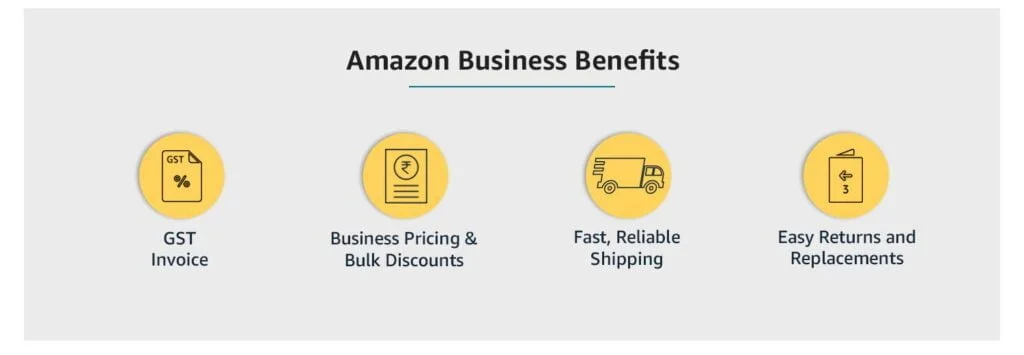
The platform offers several benefits, including:
Competitive pricing: An Amazon Business account unlocks business prices on many products, often lower than what traditional suppliers quote.
Streamlined purchasing process: Amazon Business provides a streamlined purchasing process that simplifies the procurement process for businesses. The platform offers features such as purchase orders, invoice tracking, and multi-user accounts to make the purchasing process more efficient.
Access to a vast network of suppliers: Amazon Business provides businesses with access to a vast network of suppliers, making it easier to find the products and services they need.
Customizable purchasing policies: Amazon Business allows businesses to create customizable purchasing policies that align with their unique needs.
Dedicated customer support: Every Amazon Business account gets access to dedicated customer support, ensuring that businesses receive the assistance they need when making purchases on the platform.
How to Use Amazon Business
Using Amazon Business is simple and straightforward. Businesses can open an Amazon Business account on the website and begin browsing and purchasing products and services once verified. The platform offers a range of features that make the purchasing process more efficient, including:
Multi-user accounts: One Amazon Business account can hold several users, each with its own purchasing privileges and restrictions.
Purchase orders: Amazon Business provides businesses with the ability to create purchase orders for their purchases, simplifying the invoicing and payment process.
Invoice tracking: Your Amazon Business account lets you track invoices and payments in one place, making it easier to manage your finances.
Customizable purchasing policies: Amazon Business enables businesses to create customized purchasing policies that align with their unique needs and requirements.
Integration with procurement systems: Amazon Business integrates with several popular procurement systems, including Coupa and SAP Ariba, making it easier for businesses to manage their purchasing processes.
Review your Amazon Business account settings every few months as your team grows, and remove users who no longer buy for the company.
Who Should Open an Amazon Business Account?
Any registered business that buys supplies regularly can benefit. It is most useful when purchases are frequent, involve several people, or need proper GST invoices.
- Retail shops: Packaging material, cleaning supplies, billing rolls and small equipment.
- Offices and startups: Laptops, accessories, stationery, pantry items and furniture.
- Clinics and salons: Consumables, small devices and hygiene products.
- Schools and coaching centres: Books, printers, projectors and classroom supplies.
- Freelancers and agencies with a GSTIN: Computers, cameras, software and office gear.
If you only buy for yourself once in a while, a regular account may be enough. An Amazon Business account starts to pay off when buying becomes a routine part of running the company.
How to Set Up Users and Approvals Step by Step
Once your organisation is verified, take a few minutes to set it up properly. This prevents confusion later, especially as your team grows.
- Add users: Invite colleagues who buy for the company using their work email addresses.
- Create groups: Group users by team, branch or cost centre, so spending is easy to track.
- Set roles: Decide who can buy, who can approve and who only views orders and invoices.
- Add approval rules: Require a second check for orders above an amount you choose.
- Choose payment methods: Decide which company cards or payment options each group can use.
- Save shipping addresses: Add every office or store address once, so orders reach the right place.
Exact menu names can change, so follow the current screens and help pages on the official Amazon Business India site. A well organised Amazon Business account makes month end reconciliation much easier for your accountant.
GST Invoices and Input Tax Credit Explained Simply
When you buy as a GST registered business, eligible orders can come with a GST invoice that shows your GSTIN. Your accountant may use these invoices to claim input tax credit, subject to GST rules and the nature of the purchase.
Not every item or seller qualifies in the same way, so check the invoice details on each order. You can read about GST registration and returns on the official GST portal, and ask a chartered accountant about what you can claim.
The main practical rule is simple: always place business purchases from your Amazon Business account, with the correct GSTIN selected, so the invoice is right the first time.
A Simple Monthly Buying Routine
Here is an example routine a small office could follow. Adapt it to your own size and needs.
- First week: Each team lists what it needs for the month in a shared sheet.
- Second week: One person checks business prices, quantity discounts and delivery dates, then places grouped orders.
- Third week: Approvers review large orders, and deliveries are checked against the order list.
- Month end: Download all invoices from the Amazon Business account and send them to your accountant with the purchase sheet.
Grouping orders this way reduces small, scattered purchases and makes spending easier to understand.
Common Mistakes With an Amazon Business Account
- Ordering business supplies from a personal account, so no GST invoice is generated.
- Selecting the wrong GSTIN or business address at checkout.
- Leaving former employees as active users.
- Buying in bulk only because a discount appears, without checking real need.
- Forgetting to download invoices until tax filing time.
Most of these are fixed by clear rules and a monthly review. Ten minutes spent checking your Amazon Business account settings can save hours of corrections later.
Buying vs Selling on Amazon
This type of account is meant for buying supplies for your company. If you want to sell your own products on Amazon, that is a different programme, managed through Amazon’s seller registration rather than your buyer account.
Tips to Save More With Your Amazon Business Account
- Compare the business price with the regular price before ordering.
- Buy in quantity only where the tiered discount is real.
- Set approval rules so large orders need a second check.
- Download invoices every month for your accountant.
If you plan to sell online rather than buy, our guide to ecommerce business ideas is a good next read.
Read More: How To Set Up A Google My Business Account In 5 Easy Steps
Amazon Business Account Setup Checklist
Use this list in your first week after verification. It covers the settings people most often forget.
- Business name, address and GSTIN match your registration documents.
- Every person who buys for the company has their own user, not a shared login.
- Approval rules are set for larger orders.
- Payment methods are assigned to the right teams.
- All office and store addresses are saved.
- Someone is responsible for downloading invoices every month.
- A reminder is set to review users and settings every quarter.
Once these basics are in place, your Amazon Business account becomes a simple, organised way to buy for the company instead of another app to manage.
A First Month Plan for New Users
In week one, finish verification and the checklist above. In week two, move your regular supply orders into the account and compare business prices with what you paid before.
In week three, try one bulk order where the quantity discount genuinely helps, and test the approval flow. In week four, download invoices, share them with your accountant and note what to improve next month.
Conclusion
Amazon Business offers businesses of all sizes a range of benefits, including competitive pricing, streamlined purchasing processes, access to a vast network of suppliers, customizable purchasing policies, and dedicated customer support. Setting up an Amazon Business account takes only a few minutes.
The platform is simple and straightforward to use, with a range of features that make the purchasing process more efficient. Whether you are a small startup or a large enterprise, a free Amazon Business account is worth considering as a procurement solution for your business.

FAQs Related To Amazon Business
What is Amazon Business?
Amazon Business is a B2B marketplace that offers a wide range of products and services to businesses of all sizes. The platform provides competitive pricing, streamlined purchasing processes, and access to a vast network of suppliers.
How do I sign up for Amazon Business?
Businesses can sign up for an Amazon Business account on the Amazon Business website. The process is simple and straightforward, and businesses can begin browsing and purchasing products and services immediately.
What products and services are available on Amazon Business?
Amazon Business offers a wide range of products and services, including office supplies, IT equipment, industrial tools, and much more. The platform also provides access to a vast network of suppliers, making it easier to find the products and services businesses need.
How does Amazon Business differ from regular Amazon?
Amazon Business is designed specifically for business-to-business (B2B) sales, while regular Amazon is focused on consumer sales. Amazon Business provides a range of features that are tailored to the unique needs of businesses, including customizable purchasing policies and multi-user accounts.
How does Amazon Business pricing work?
Amazon Business offers competitive pricing on its products and services, often at a lower cost than traditional suppliers. The platform also provides volume discounts for businesses that purchase large quantities of products.
How does Amazon Business handle invoicing and payments?
Amazon Business provides a range of features to simplify the invoicing and payment process for businesses. The platform allows businesses to create purchase orders, track invoices and payments, and integrate with popular procurement systems.
What are the benefits of using Amazon Business?
Amazon Business offers several benefits to businesses, including competitive pricing, streamlined purchasing processes, access to a vast network of suppliers, customizable purchasing policies, and dedicated customer support.
How does Amazon Business ensure the quality of its products and services?
Amazon Business works closely with its suppliers to ensure that the products and services offered on the platform meet high-quality standards. The platform also provides customer reviews and ratings to help businesses make informed purchasing decisions.
Can businesses use Amazon Business internationally?
Yes, Amazon Business operates in several countries, including the United States, the United Kingdom, Germany, France, Italy, Spain, Japan, and India. Businesses can use the platform to purchase products and services from suppliers in these countries.
How does Amazon Business provide customer support?
Amazon Business offers dedicated customer support to its users, with a range of resources available to help businesses make the most of the platform. Businesses can contact customer support through the Amazon Business website or by phone.