
This SEO for beginners guide starts with a simple truth: in 2026, having a strong online presence is crucial for any business. With millions of websites on the internet, it can be challenging to get noticed. This is where search engine optimization, or SEO, comes in.
SEO is the process of optimizing your website to rank higher in search engine results pages (SERPs) and drive organic traffic to your site. In this article, we cover SEO for beginners step by step: on page optimization, off page optimization, keyword research, technical basics and a simple 30 day plan.
On Page SEO for Beginners
On-page optimization refers to the optimization of individual web pages to rank higher and earn more relevant traffic in search engines. Some key on-page optimization factors include:
Title Tag: The title tag is the main headline of your page that appears in search engine results. Make sure it is descriptive and contains your target keyword. A common rule in SEO for beginners is to keep it short enough, roughly 60 characters, so Google does not cut it off.
Meta Description: The meta description is a brief description of your page that appears in search engine results. It should be compelling and contain your target keyword.
Heading Tags: Use H1, H2, and H3 tags to structure your content and make it easier for search engines to understand.
Content: Your content should be high-quality, engaging, and relevant to your target audience. In SEO for beginners, the best habit is to answer the search completely before you worry about keyword counts.
URL Structure: Use descriptive and keyword-rich URLs to help search engines understand the content of your page.
Off Page SEO for Beginners
Off-page optimization refers to the optimization of factors outside of your website that can impact your website’s search engine rankings. Some key off-page optimization factors include:
Backlinks: Backlinks are links from other websites that point to your website. The more high-quality backlinks you have, the higher your website will rank in search engine results. When you practise SEO for beginners, earn links from local partners, suppliers and genuine guest articles instead of buying them.
Social Media: Social media can help you build your brand and drive traffic to your website. Make sure to share your content on social media and engage with your followers.
Local Listings: If you have a physical location, make sure to claim your listing on Google Business Profile, Justdial and other local directories that your customers actually use.
Keyword Research
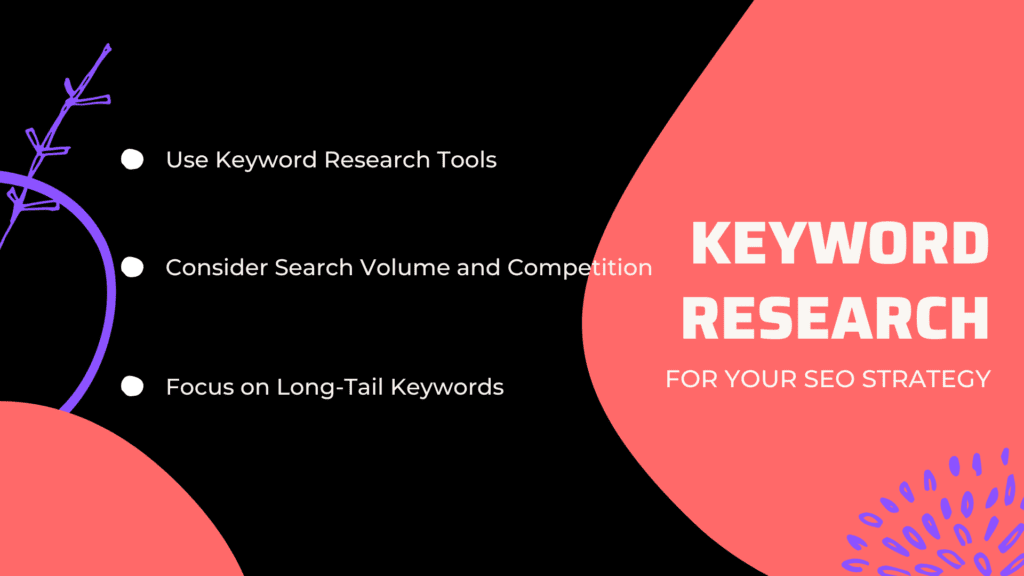
Keyword research is where SEO for beginners really starts, because it shows the exact words your audience types into Google. Some key tips for keyword research include:
Use Keyword Research Tools: Use tools like Google Keyword Planner, SEMrush, and Ahrefs to identify relevant keywords and phrases.
Consider Search Volume and Competition: Choose keywords with high search volume and low competition to improve your chances of ranking higher in search engine results.
Focus on Long-Tail Keywords: Long-tail keywords are longer and more specific phrases that are less competitive but can drive more relevant traffic to your website. They are the easiest win in SEO for beginners because big brands often ignore them.
Technical SEO for Beginners: The Basics
You do not need to code to cover the technical basics. Make sure your site loads fast on mobile, uses HTTPS, has an XML sitemap and is verified in Google Search Console.
Search Console also shows the real queries people use to find you, which is the most honest keyword data you can get for free. Google explains every setting in its Search Central documentation.
A Simple 30 Day SEO for Beginners Plan
- Week 1: Set up Google Search Console and Google Analytics, and fix any important page that is not indexed.
- Week 2: Pick five keywords with clear intent and map each one to a single page.
- Week 3: Improve the titles, headings and content of those pages so they answer the search fully.
- Week 4: Link related pages to each other and share your best page where your audience already spends time.
Repeat this SEO for beginners cycle every month. SEO results usually take a few months, so judge progress by impressions and clicks in Search Console rather than daily rank checks.
Common Mistakes in SEO for Beginners
- Stuffing the same keyword into every sentence.
- Copying content from other websites.
- Buying cheap backlink packages that can harm your site.
- Ignoring how the site looks and loads on mobile phones.
If your site runs on WordPress, our comparison of WordPress SEO plugins shows how to set up these basics quickly. For a wider reading list, the Ultimate Digital Marketing Bundle is a structured next step.
SEO for Beginners: Key Terms in Plain English
SEO has a lot of jargon, which scares many new site owners. Learning a few words first makes the whole topic far less confusing. So here are the terms you will see most often, explained simply.
- Keyword: the words a person types into Google, such as “cake shop near me”.
- Search intent: what the person actually wants, whether to learn, compare, buy or find a place.
- SERP: the search engine results page, the list Google shows after a search.
- Indexing: Google storing your page so it can show it in results. A page that is not indexed cannot rank.
- Crawling: Google’s bot visiting and reading your pages, usually by following links.
- Backlink: a link from another website to yours.
- Internal link: a link from one page of your site to another page on the same site.
- Anchor text: the clickable words of a link.
- Organic traffic: visitors who arrive from unpaid search results, not ads. Growing it is the main goal of SEO for beginners.
Once these words feel familiar, most beginner guides become much easier to follow.
A Worked Example: Optimising One Page
Theory makes more sense with an example, so let us apply these ideas to one realistic page. Picture a small bakery in Jaipur that wants its eggless cakes page to appear for local searches.
- Pick the keyword. The owner types “eggless cake” into Google and notes the suggestions, such as “eggless cake Jaipur” and “eggless cake delivery”.
- Check the results. The top results are local shops and delivery pages, so a product style page with prices and an order button fits the intent.
- Write the title. “Eggless Cakes in Jaipur, Fresh Daily with Home Delivery” is clear, readable and under 60 characters.
- Write the description. One or two sentences that mention flavours, delivery areas and how to order.
- Improve the content. Add real photos, flavours, sizes, delivery timings, and answers to questions customers ask on WhatsApp.
- Add internal links. Link from the home page and from a “birthday cakes” page to this page.
- Update the Google Business Profile. Add the same products and photos, and ask happy customers for honest reviews.
Nothing in this example needs paid tools or code. That is the heart of SEO for beginners: match the page to what the searcher wants and make it easy to find.
Set Up Google Search Console in Minutes
Google Search Console is a free tool that shows which searches bring people to your site and whether your pages are indexed. In any plan for SEO for beginners, this belongs on day one.
- Sign in at Google Search Console with your Google account.
- Add your website as a property and verify ownership using one of the offered methods, such as a DNS record or an HTML tag.
- Submit your sitemap, which most WordPress SEO plugins create automatically.
- Check the Pages report after a few days to see which pages are indexed.
- Open the Performance report to see queries, clicks, impressions and average position.
Google’s own Search Console Help Centre explains each report in detail.
Free Tools for SEO for Beginners
You can learn and practise without spending money. The tools below cover everything SEO for beginners needs.
- Google Search Console for indexing, search queries and errors.
- Google Analytics to see what visitors do once they land on your site.
- Google Business Profile for local search and maps.
- Google Trends to compare interest in topics over time and by region.
- Google autocomplete and “People also ask” for real questions people search.
- PageSpeed Insights to check how fast your pages load on mobile.
- A WordPress SEO plugin for titles, descriptions and sitemaps.
SEO for Beginners Checklist for Every New Page
Run through this list before you publish any page or blog post, and keep it saved where you write.
- One clear main keyword, matched to the search intent.
- The keyword in the title, the first paragraph and at least one subheading, used naturally.
- A meta description that tells the reader what they will get.
- A short, readable URL.
- Helpful headings that break the page into sections.
- Images with descriptive alt text and compressed file sizes.
- At least two internal links to related pages.
- A link to a trusted outside source where it helps the reader.
- Content that answers the question fully, written for people first, which is the core rule of SEO for beginners.
A Simple Template for Blog Posts That Rank
Most beginners struggle with structure, not ideas. A repeatable outline makes every article easier to write and easier for Google to understand.
- Opening: answer the main question in the first two or three sentences, then say what the article covers.
- Main steps or sections: one heading per step or subtopic, each answering a smaller question.
- Example: show the advice applied to a real situation your reader faces.
- Mistakes or warnings: point out what usually goes wrong.
- FAQ: answer three to five follow up questions from “People also ask”.
- Next step: link to a related guide or product that genuinely helps.
Using one template across your blog is a quiet habit of SEO for beginners that pays off. Readers learn where to find answers, and you spend less time staring at a blank page.
Update Old Posts Before Writing New Ones
If your site already has articles, look at them before you write more. Posts that get impressions but few clicks often need a better title, fresher facts or a clearer answer near the top.
Search Console shows these pages in the Performance report. Improving them is one of the quickest wins in SEO for beginners, because Google already knows the page exists.
How Long Does SEO Take?
SEO is slow by nature, and no honest person can guarantee rankings or dates. New pages often take weeks or months to settle, depending on competition, the age of your site and how useful the content is.
A realistic view of SEO for beginners is to measure progress by trends, not single days. If impressions in Search Console rise month after month, your work is moving in the right direction, even before clicks follow.
Conclusion
SEO for beginners can feel like a complex topic, but it is essential for any business that wants to improve its online presence and drive organic traffic to its website. By focusing on both on-page and off-page optimization, conducting keyword research, and staying up-to-date with the latest SEO trends and best practices, you can improve your website’s search engine rankings and attract more relevant traffic to your site.
Remember that SEO for beginners is only the start, because SEO is an ongoing process that needs consistent effort to show results. By regularly analyzing your website’s performance and making adjustments to your SEO strategy, you can continue to improve your search engine rankings and drive more traffic to your site.
So, whether you are a small business owner or a marketing professional, learning SEO for beginners is one of the most useful skills you can build for your business. By following the tips and best practices outlined in this article, you can take the first steps towards improving your website’s visibility in search engine results and driving more traffic to your site.
Read More: The Ultimate Guide To Search Engine Optimization?

FAQs Related To Search Engine Optimization (SEO)
What is SEO?
SEO stands for Search Engine Optimization, which is the process of optimizing a website to rank higher in search engine results pages and drive organic traffic to the site.
Why is SEO Strategy important for businesses?
SEO strategy is important because it can help businesses increase their online visibility, attract more traffic to their website, and ultimately generate more leads and sales.
What are some key on-page optimization factors?
Some key on-page optimization factors include title tags, meta descriptions, heading tags, content, and URL structure.
What are some key off-page optimization factors?
Some key off-page optimization factors include backlinks, social media, and local listings.
How can I conduct keyword research?
You can conduct keyword research using tools like Google Keyword Planner, SEMrush, and Ahrefs, among others.
How long does it take to see results from SEO Strategy?
SEO is a long-term strategy, and it can take several months to see results. However, with consistent effort and optimization, you can improve your website’s search engine rankings and drive more organic traffic to your site.
Is SEO Strategy only for large businesses?
No, SEO strategy is beneficial for businesses of all sizes. In fact, small businesses can often benefit the most from SEO as it can help them compete with larger businesses in search engine results.
Can I do SEO myself, or do I need to hire an agency?
You can do SEO yourself, but it can be time-consuming and requires ongoing effort and optimization. Hiring an SEO agency can be a more efficient and effective way to improve your website’s search engine rankings.
What are some common mistakes to avoid in SEO Strategy?
Some common mistakes to avoid in SEO strategy include keyword stuffing, using duplicate content, and neglecting mobile optimization.
How can I stay up-to-date with the latest SEO trends and best practices?
You can stay up-to-date with the latest SEO trends and best practices by reading industry blogs and publications, attending conferences and webinars, and following SEO experts on social media.